
Client context
Skylar uses the sales motion, buyer profile, offer, market, and commercial situation behind the practice.
Scenario creation
Skylar turns client context, coach input, methodology, and practice data into realistic sales conversations with assessment feedback attached.
Scenario creation is an input-to-output loop: Skylar extracts what matters, aligns it to the coaching goal, tailors the conversation, then returns role-plays and skill feedback.
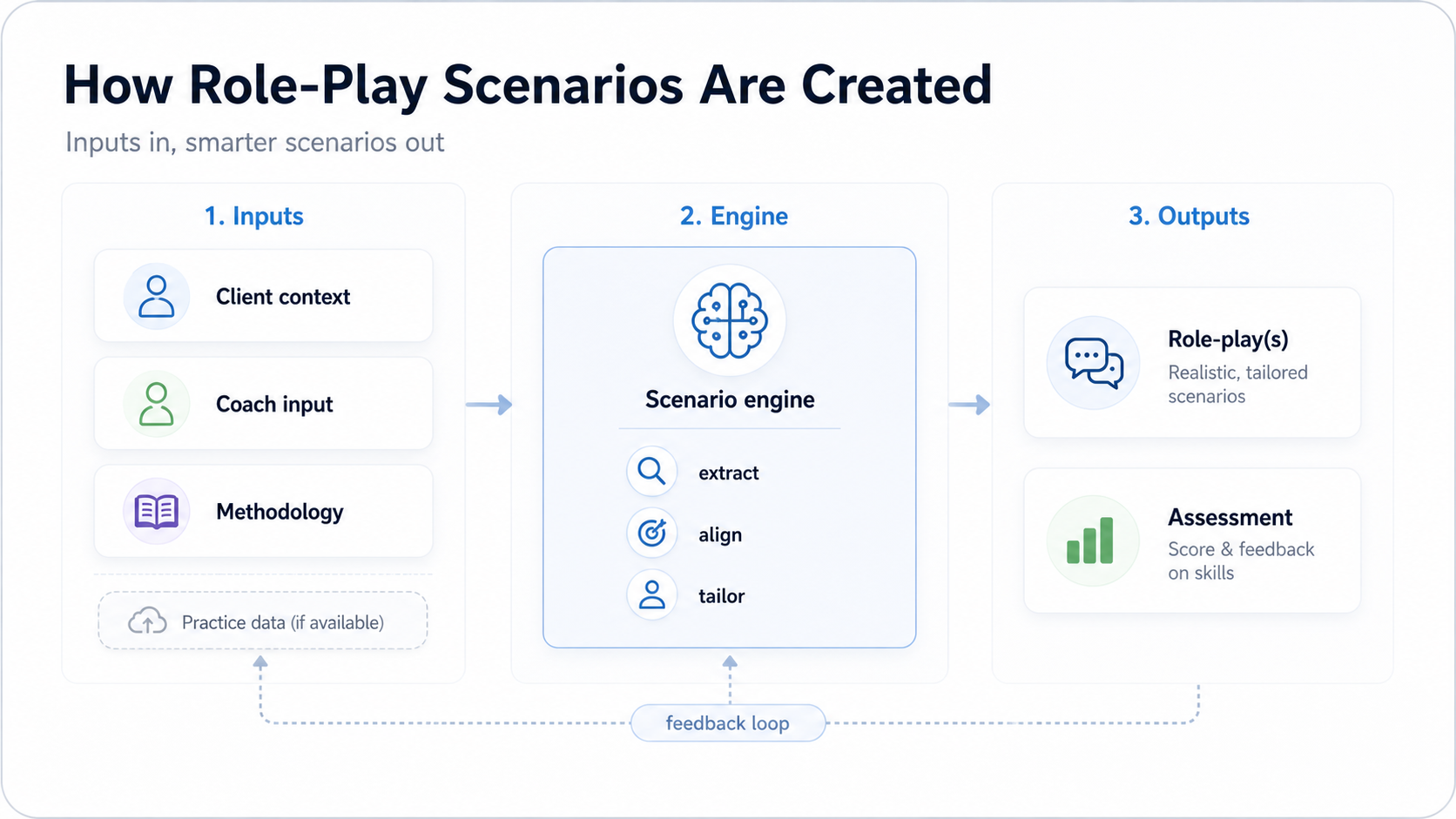
The strongest role-plays are built from the same material a human coach would ask for before designing a practice session. Skylar combines business context with coaching intent, then turns that into a conversation a salesperson can actually rehearse.
Skylar uses the sales motion, buyer profile, offer, market, and commercial situation behind the practice.
Coaches add the priorities that matter: objection types, discovery habits, messaging, and deal standards.
The scenario can reflect the framework your team uses, from discovery and qualification to next-step control.
When available, previous attempts and assessment patterns help the next scenario become more targeted.
Scenario engine
The engine is where raw information becomes a structured role-play: a buyer, a situation, a conversation goal, and a way to judge performance.
Step 1
Skylar identifies the useful facts, constraints, buyer signals, and coaching goals from the material provided.
Step 2
The scenario is matched to the organisation, coach expectations, methodology, and skill being assessed.
Step 3
The buyer role, conversation pressure, scoring rubric, and feedback focus are adjusted for the learner.
Skylar does not just create a prompt for a conversation. It creates a practice experience that can be scored, reflected on, and improved over time.
Users practise realistic conversations that reflect the customer, sales motion, and coaching priorities they actually face.
Skylar scores the attempt and returns feedback tied to the skills and behaviours the coach wants to improve.
Feedback loop
The assessment is not only an end point. It gives coaches and admins evidence about where users need more practice, which scenarios are working, and which skills need sharper coaching.
When practice data is available, that evidence can feed the next round of scenario creation. The result is a programme that gets more precise as users practise.
Short answers for coaches, enablement teams, and admins designing Skylar practice.
Skylar can use client context, coach input, methodology, and practice data. The more specific the inputs, the more relevant the role-play and assessment can be.
Yes. The scenario can be shaped around the methodology, behaviours, language, and scoring criteria your team already uses.
Practice data helps close the loop. It shows where users are strong or weak, so future scenarios and coaching feedback can become more targeted.
The user receives a realistic role-play experience and assessment feedback that helps them understand what to repeat, change, and practise next.
Speak with the Skylar team about turning your methodology and coaching priorities into practice.